What is an ad blocker? A short definition
An ad blocker is an app, browser extension, or network setting that stops ads, pop-ups, and tracking scripts from loading on your device. It compares each page request against filter lists and rejects those that match known ad and tracker servers.
The effect is immediate: cleaner pages, often faster loads, and less behavioral data sent to third parties. For users, that makes an ad blocker both a comfort tool and a privacy tool. For anyone who runs ads, it is a measurement problem.
You may also see the same idea called an adblocker, an ad-blocking extension, or a content blocker, which is the term Apple uses for Safari.
How ad blockers work: four steps behind a clean page
An ad blocker refuses requests to known ad and tracker addresses using filter lists, then hides any leftover ad boxes that slip through.
Types of ad blockers: from browser extensions to DNS
There are five types: browser extensions, browsers with built-in blocking, device apps, ad-blocking DNS, and Safari content blockers. They differ in how deeply they can filter a page.
| Type | How it works | Examples | Best for |
|---|---|---|---|
| Browser extension | Installed in the browser, filters requests and page elements | uBlock Origin, uBlock Origin Lite, AdGuard, Adblock Plus | Desktop users |
| Browser with built-in blocking | Blocking is on from the start, no extension needed | Brave (Shields) | Beginners |
| Device app | Filters traffic at the device level | AdGuard app | People who want apps covered too |
| Ad-blocking DNS | Refuses ad domain names before a connection is made | AdGuard DNS, Pi-hole | Every device on one network |
| Safari content blocker | Blocking rules run by Safari on iPhone, iPad, and Mac | Content blocker apps from the App Store | iPhone users |
Which one filters most deeply?
Extensions and apps can clean up elements inside a page. DNS is lighter and protects every device, but it can only refuse a whole domain, so ads served from the same domain as the content still get through.
Best ad blockers in 2026: options by browser and device
For full-strength blocking, use uBlock Origin in Firefox or Brave. In Chrome, use a Manifest V3 extension such as uBlock Origin Lite, because the full uBlock Origin was removed from the Chrome Web Store on August 31, 2026.
| Device | Options | Notes |
|---|---|---|
| Chrome on desktop | uBlock Origin Lite, AdGuard, Adblock Plus | Chrome has disabled Manifest V2 since version 139, and the Chrome Web Store removed all Manifest V2 extensions on August 31, 2026 |
| Firefox on desktop | uBlock Origin | Firefox still supports Manifest V2 extensions, so the full version keeps working |
| Brave | Built-in Shields | uBlock Origin and AdGuard can be enabled from the Manifest V2 extension settings |
| Android | Firefox with uBlock Origin, Brave, or Private DNS | Chrome on Android does not support extensions |
| iPhone and iPad | Content blocker apps for Safari | Turned on in Safari settings |
This change makes many older guides inaccurate, including those that still recommend uBlock Origin for Chrome. Check the update date on any guide you follow.
How to install an ad blocker on Chrome, Firefox, Android, and iPhone
Install from the project's official link, turn it on, then test it on an ad-heavy page. Steps for each device are below.
Chrome on a computer
- Open the Chrome Web Store and search for uBlock Origin Lite (developer Raymond Hill) or AdGuard.
- Click Add to Chrome and approve the permissions it asks for.
- Open an ad-heavy page to test. Click the extension icon if you want to turn it off for a specific site.
Firefox on a computer
- Open addons.mozilla.org and search for uBlock Origin.
- Click Add to Firefox and approve its permissions.
- Test it on an ad-heavy page.
Android
- Option 1, Firefox: install Firefox from Google Play, open the Add-ons menu, and add uBlock Origin.
- Option 2, Brave: install Brave. Shields are on from the start.
- Option 3, Private DNS (Android 9 and later): open Settings, Network and internet, Private DNS, choose the provider hostname option, and enter the address from your ad-blocking DNS provider's guide. Android supports only DNS-over-TLS in this setting.
iPhone and iPad
- Install a content blocker app from the App Store.
- Open Settings, Apps, Safari, Extensions (on older iOS: Settings, Safari, Extensions).
- Turn the blocker on and allow it for the sites you visit.
Are ad blockers safe and legal?
Ad blockers from trusted developers are safe, but fake ones exist. Installing one on your own device is generally allowed, although YouTube says ad blockers violate its Terms of Service.
Safety: watch for fake extensions
In 2018, AdGuard found five fake ad-blocking extensions in the Chrome Web Store with more than 20 million installs, and Google removed them. In 2026, Bay Area Labs reported an ad-blocking extension carrying a Featured badge that collected data about the sites users visited. An official store listing is not a guarantee.
- Install from the link on the project's own website, not from store search results.
- Check the developer name, user count, and last update date.
- Reject extensions that ask for broader permissions than their function needs.
YouTube and its Terms of Service
YouTube says ad blockers violate its Terms of Service. In extreme cases, when viewers keep ignoring requests to allow ads, YouTube may temporarily disable video playback.
The legal side
In April 2018, Germany's highest court rejected Axel Springer's attempt to ban Adblock Plus. Legal disputes over ad blocking in Germany have continued since. This is not legal advice; for company policy, consult a lawyer in your jurisdiction.
Who uses ad blockers: usage data for 2025 and 2026
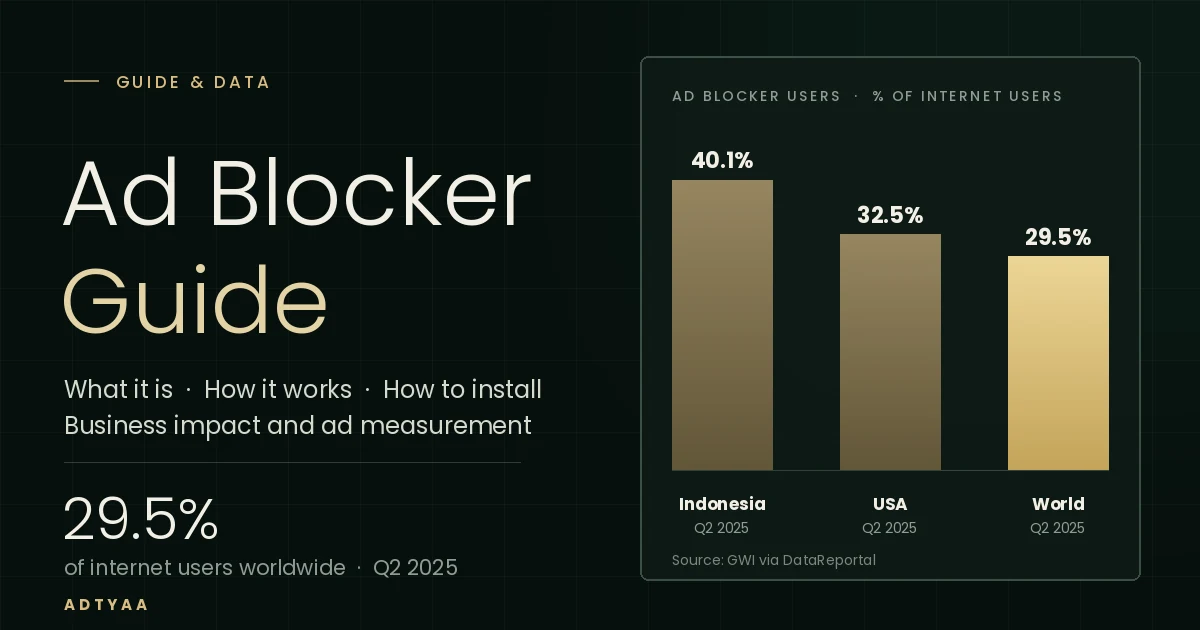
About 29.5% of internet users worldwide use ad blockers at least sometimes (Q2 2025). The figure is 32.5% in the United States and 40.1% in Indonesia, the highest among the countries GWI studied.
| Region | Share of internet users |
|---|---|
| Indonesia | 40.1% |
| United States | 32.5% |
| World | 29.5% |
Usage skews younger. Among 16 to 24-year-olds, 34.1% of men and 24.7% of women use ad blockers, according to GWI data reported by DataReportal. These shares count anyone who uses a blocker at least sometimes, not every visit.
Why people install them: the Indonesian example
Indonesia offers a detailed look at motives. Most users cite the volume of ads, not advertising in general.
| Reason for using an ad blocker | Internet users in Indonesia |
|---|---|
| Too many ads | 73.2% |
| To stop inappropriate content appearing | 45.8% |
| To protect privacy | 39.2% |
| To improve device performance | 34.1% |
| To stop companies collecting personal data | 18.7% |
Source: We Are Social and Meltwater, Digital 2026: Indonesia (October 2025 survey), as reported by GoodStats. Respondents could choose more than one reason.
What ad blockers mean for business, and how to respond
Ad blockers do not remove your audience, but they stop some ads from showing and some data from being sent. The fix is to change how you measure: record results in your own systems, not only in browser pixels.
| What is affected | Why | How to respond |
|---|---|---|
| Display ads | Requests to ad servers are refused, so impressions never happen | Balance spend with content, email, and WhatsApp that people seek out |
| Pixels and measurement tags | Tracking scripts are blocked in the browser | Send conversions from the server: Meta's Conversions API, Google's enhanced conversions, server-side tagging |
| Retargeting audiences | Visitors who block trackers never join the audience list | Build your own contact lists with the data owner's consent |
| Attribution | Platform reports count fewer results than actually occurred | Reconcile with internal data: WhatsApp clicks, calls, form submissions, appointments |
Five practical steps
- Record results in your own system. Log WhatsApp clicks, calls, forms, and appointments in a CRM or internal sheet.
- Send conversions from the server. This reduces dependence on scripts a browser can block.
- Build first-party data. Collect contacts who agree to be reached by WhatsApp or email.
- Make pages and ads lighter. Too many ads and poor performance are two leading reasons people install blockers.
- Respect the visitor's choice. Messages that force people to turn off their blocker risk driving them away.
For clinics and hospitals, the outcomes most resilient to ad blockers are WhatsApp clicks, calls, and appointments recorded in internal systems. The same measurement also sets a better basis for Google Ads and Meta Ads budgets.
Ad blocker myths and facts
Ad blockers are not all equal, not always safe, and not limited to blocking ads.
| Myth | Fact |
|---|---|
| Ad blockers only block ads | Many also block trackers and malicious domains, which affects analytics data. |
| All ad blockers are equally strong | Capabilities differ. In Chrome, Manifest V3 versions are more limited than the full uBlock Origin in Firefox. |
| Extensions in the official store are always safe | Fake extensions have reached the Chrome Web Store, in 2018 and again in a 2026 report. |
| People who use ad blockers reject all advertising | In Indonesia the top reason is too many ads (73.2%), not advertising in general. |
| Using an ad blocker on YouTube is risk-free | YouTube says it violates its Terms of Service and may temporarily disable playback. |
Frequently asked questions about ad blockers
An ad blocker is an app, browser extension, or network setting that stops ads, pop-ups, and tracking scripts from loading on your device. It compares each page request against filter lists and rejects those that match known ad and tracker servers.
Ad blockers from trusted developers are safe, but fake extensions have reached the official Chrome store. Install from the link on the project's own website, check the developer name, and avoid extensions that ask for broader permissions than they need.
The full uBlock Origin was removed from the Chrome Web Store on August 31, 2026, when Chrome ended Manifest V2 support. In Chrome, use a Manifest V3 extension such as uBlock Origin Lite or AdGuard. For full-strength blocking, use Firefox or Brave.
On Android, install Firefox and add uBlock Origin from its Add-ons menu, use Brave, or point Private DNS at an ad-blocking DNS provider. On iPhone, install a content blocker app from the App Store, then turn it on in Settings under Safari, Extensions.
Installing an ad blocker on your own device is generally allowed. Germany's highest court rejected Axel Springer's attempt to ban Adblock Plus in 2018. However, YouTube says ad blockers violate its Terms of Service and may temporarily disable playback.
About 29.5 percent of internet users worldwide use ad blockers at least sometimes, according to Q2 2025 GWI data reported by DataReportal. The figure is 32.5 percent in the United States and 40.1 percent in Indonesia, the highest among the countries GWI studied.
YouTube says ad blockers violate its Terms of Service. Viewers are shown repeated requests to allow ads, and in extreme cases where they keep ignoring them, playback can be temporarily disabled.
Ad blockers can hide some ads and block the pixels and tags that measure results, so conversions are under-reported. The fix is to record outcomes in your own systems and send conversions from the server, for example with Meta's Conversions API and Google's enhanced conversions.
DataReportal, Digital 2026: Indonesia
Backlinko, ad blocker usage statistics (GWI via DataReportal)
Databoks Katadata, ad blocker use in Indonesia (We Are Social, Q2 2025)
GoodStats, why Indonesians use ad blockers (We Are Social, Digital 2026)
CyberInsider, uBlock Origin removed from the Chrome Web Store
TechRadar, Manifest V2 support has ended in Chrome
AdGuard, uBlock Origin disabled in Chrome
Mozilla Add-ons, uBlock Origin
AdGuard DNS, Private DNS setup on Android
Android Authority, YouTube's policy on ad blockers
TechRadar, five fake ad blockers removed from the Chrome Store (AdGuard, 2018)
Dark Reading, ad-blocking extension spyware (Bay Area Labs, 2026)
VentureBeat, Germany's top court rules ad blockers legal
Itechify, Firefox Android add-ons and Chrome on Android